 SixOnFive
Getting started
Put SixOnFive on your phone, sign in with an emailed code, and join your team.
SixOnFive is a phone app for scoring water polo games play by play, from the stands, and sharing them live with the team. It works without signal at the pool and catches up when signal comes back. It's free during the beta.
Who's who on a team
| Role | Who it's for | What they can do |
|---|---|---|
| Head Coach | One per team | Everything, including handing the Head Coach role to someone else and removing Staff |
| Staff | Team manager, assistant coach, team parent who helps | Almost everything: roster, schedule, settings, invites, approvals, scoring |
| Scorer | A parent the coach trusts to keep stats | Add, start and score games. No roster, settings or people changes |
| Family | Parents, grandparents, friends | See the schedule, results, stats and roster, watch games live, post in Team Chat |
Players don't have accounts. Only adults sign in.
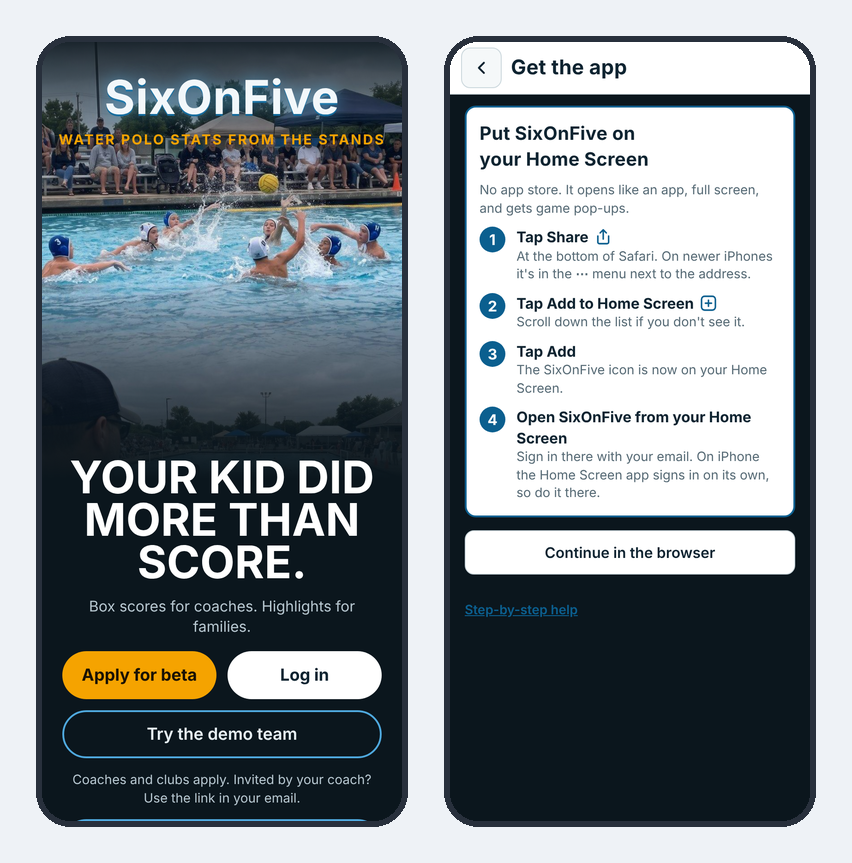
Put SixOnFive on your home screen
SixOnFive runs from your phone's home screen like any app. You don't download it from the App Store or Google Play.
Android (Chrome, Edge or Samsung Internet)
- Open app.sixonfive.com/#install on your phone.
- Tap Install the app, then Install.
- Open SixOnFive from your home screen.
iPhone or iPad (Safari)
- Open app.sixonfive.com/#install in Safari.
- Tap Share (the square with an arrow, at the bottom of Safari, or under the ⋯ menu on newer iPhones).
- Tap Add to Home Screen, then Add.
- Open SixOnFive from your Home Screen and sign in there.
On iPhone, the Home Screen app keeps its own sign-in, separate from Safari. Sign in from the Home Screen app, or you'll be asked to sign in twice.
If you opened the link inside another app (Gmail, Instagram, Facebook), open it in Safari or your phone's browser first.
Sign in
There's no password. Type your email, and SixOnFive emails you a code. Type the code (or let your phone fill it in) and you're signed in. The code comes from noreply@mail.sixonfive.com; check your spam folder if it doesn't show up within a minute.
Join your team
| You got… | What happens |
|---|---|
| An email invite from the coach or Staff | Open the button in the email and sign in with that same email. You're on the team right away. |
| The team link (shared by the coach) | Sign in, pick your player, and you're on the team. If the coach turned on approval, you wait for their OK. |
| A link from another parent | Sign in and pick your player. The Head Coach or Staff approve you first. |
When you join, SixOnFive asks Who's your player? Pick your child and whether you're their parent/guardian or a family member/friend, or choose Just following the team.
Try it first
Tap Try the demo team on the opening screen to explore a full made-up season, as a coach or as a parent. Nothing you do there is sent anywhere. You can also watch a demo game live.