 SixOnFive
Scoring a game
Start a game, take the sprint, score every play, fix mistakes and finish.
- Before the game
- Start every quarter with the sprint
- The scoring board
- Scoring a goal, step by step
- Other plays
- Fixing mistakes
- Ending quarters and the game
- Two scorers on one game
Anyone with scoring rights (Head Coach, Staff or a Scorer) can score. Every play saves on your phone first, so a dead spot at the pool loses nothing; it sends when signal comes back. Keep the paper score sheet as the official record during the beta.
Before the game
- Open Schedule and tap Score on today's game. No game on the schedule? Tap + Add a game, fill in the opponent, date and time, and tap Save and start scoring.
- On the New game screen, check the details, the cap color (Dark or White) and the game type. Scrimmages and practices can be left out of season stats.
- Check Game rules (quarter length, timeouts, overtime). The team's default is usually right.
- Optional: paste Their roster (one per line, cap then name). Otherwise score by cap number; you can name a cap during the game.
- Under Who is here?, tap Here off for anyone who isn't at the game.
- Tap Start game.
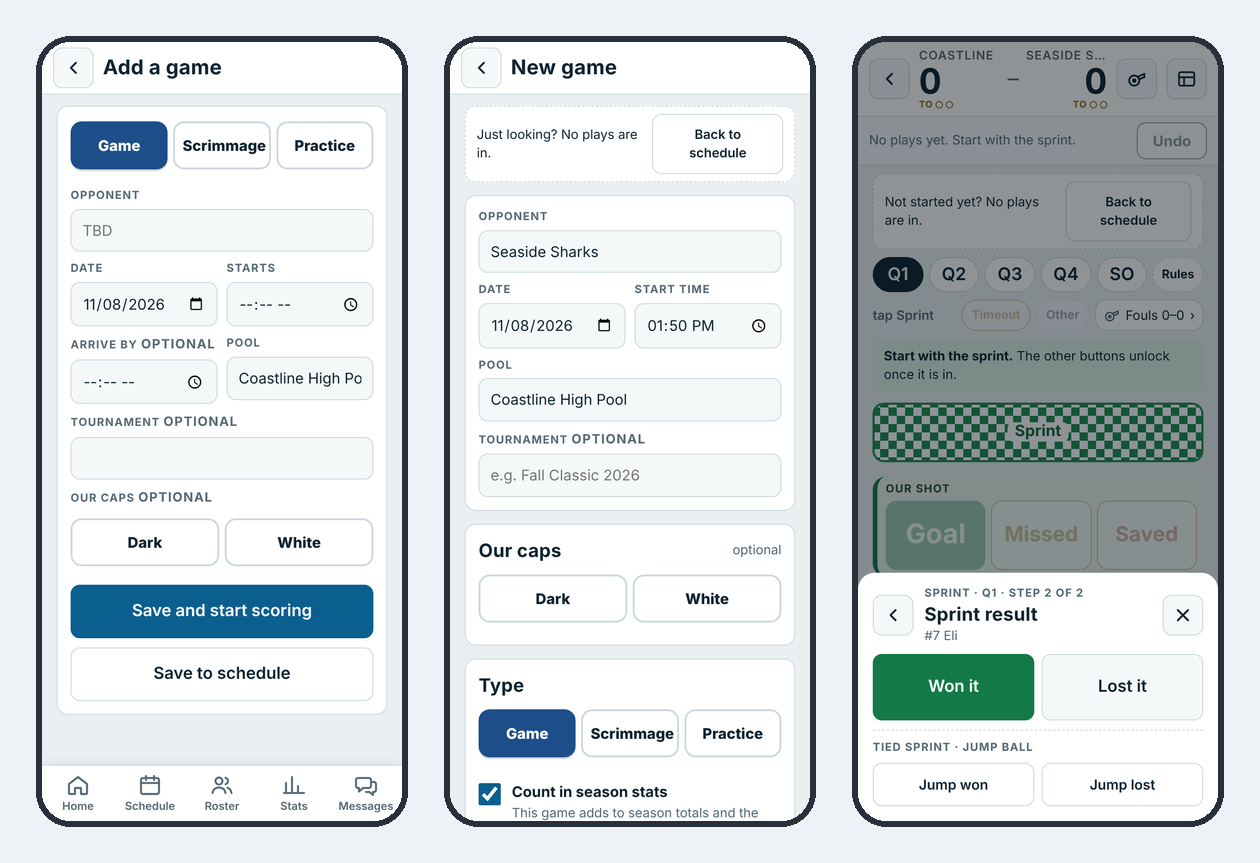
Started the wrong game? While no plays are in, tap Back to schedule and the game goes back on the Schedule with its details kept.
Start every quarter with the sprint
The board stays locked until the sprint is in. Tap Sprint, pick who swam it, then Won it or Lost it. A tied sprint is Jump won or Jump lost.
The scoring board
The board has four panels. Green panels are good for us; red panels are good for them.
| Panel | Buttons |
|---|---|
| Our shot | Goal · Missed · Saved |
| Our play | Steal · Field block · Ejection drawn · 5M drawn |
| Against us | Turnover · Ejection · 5M penalty |
| Opponent shot | Save · Miss · Goal, with our goalie above |
Above the panels: the score and timeouts, the quarter, Timeout, Other, Fouls, and End Q1 once the sprint is in. The goalie button (In goal: #1 Ryan ▾) switches goalies.
What shows on the board depends on what your team tracks. A Basic team skips the pool, cage and shot-type steps below.
Scoring a goal, step by step
- Tap Goal.
- Who scored? Tap the player.
- Assisted by? Tap the player, or No assist.
- Where did they shoot from? Tap the pool. (Advanced teams only. Skip is always there.)
- Where did it go in? Tap the spot on the cage, seen from the shooter. Pick the shot type (Direct, Skip, Lob) and situation if your team tracks them.
- Time on the scoreboard: type the clock as it shows on the pool scoreboard, like 3 4 2 for 3:42, then Save.
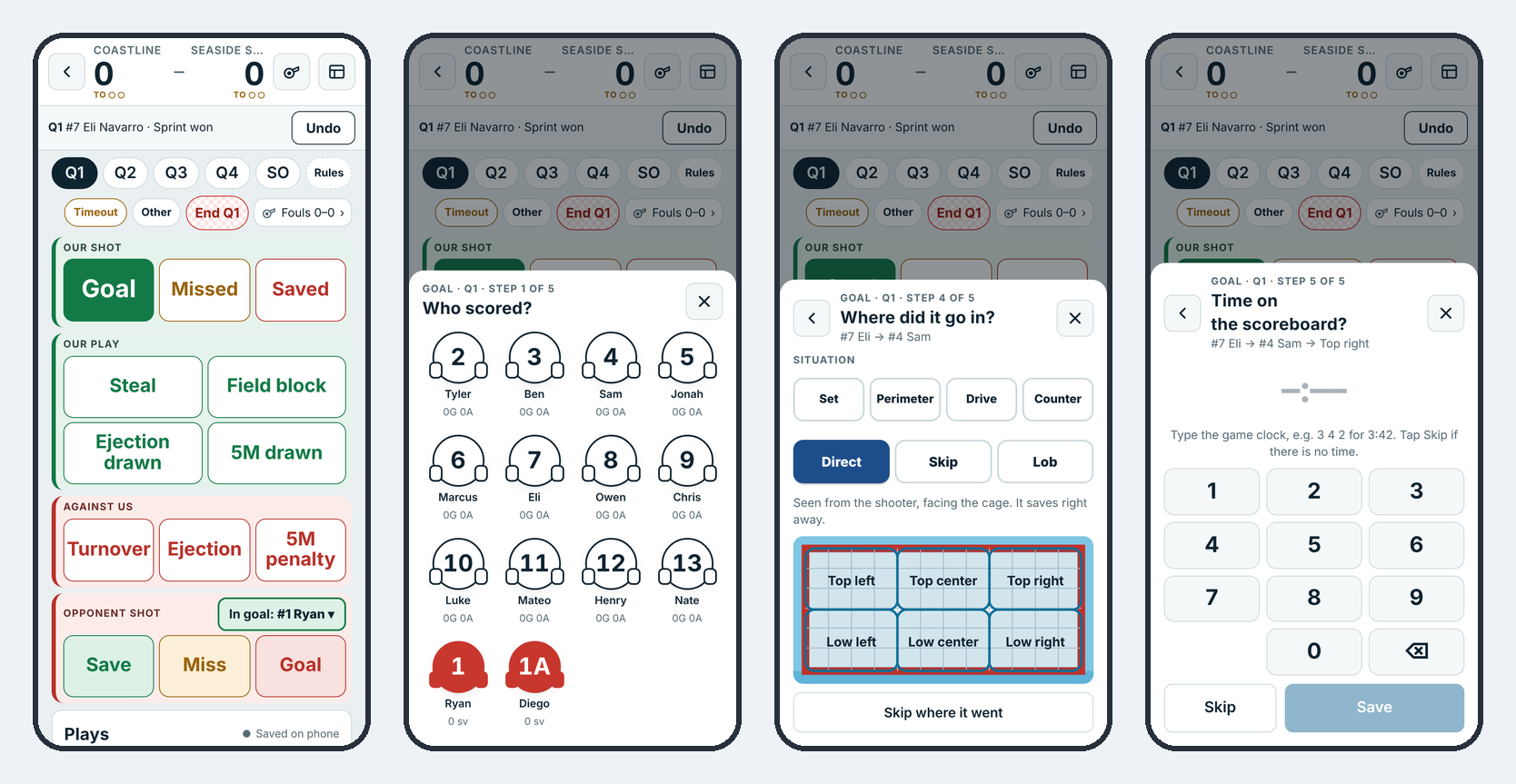
Missed and Saved work the same way, without the assist. A shot stopped by a field player is Field block on the cage screen.
Other plays
- Steal: who, then Steal, Interception or Ball under.
- Turnover: who, then Turnover, Bad pass, 2 m offside, Offensive foul or Ball under.
- Ejection drawn and Ejection: who drew it or who was excluded. SixOnFive tracks the 6 on 5 (or 5 on 6) and ends it on the next play.
- 5M drawn and 5M penalty: walks you through the penalty shot.
- Opponent shot: type their cap number. Their players you've already used show as quick picks.
- Timeout: us or them, full or 30-second, or the referee. The lights under the score show how many are left.
- Fouls: personal fouls by player. The button turns red when someone is in foul trouble; three fouls is out.
- Other: rare plays: Misconduct / game exclusion, Penalty-exclusion, Double ejection, Card (yellow or red, players or coaches) and Cap swap.
Fixing mistakes
- Undo takes back the last play.
- Tap any play in the list below the board to Edit it (change the player, the play type, the assist, the shot spots) or Delete it. Score and stats update right away.
- A finished game can be fixed later from its box score with Reopen & edit, for example while watching film.
Ending quarters and the game
At the end of a quarter, tap End Q1 and confirm. The play list and live view get "End of Q1" with the score. The next quarter starts with its sprint. Ended a quarter by mistake? Back to Q1 undoes it.
After the fourth quarter, tap End game. If it's tied, the game rules decide what comes next: overtime periods, golden goal, then a shootout. In a shootout, the board changes to Our shooter and Their shooter.
Two scorers on one game
Two scorers give better stats. If someone else is already scoring, you'll see Score it too. Your phone scores a second version that families never see. After the game (or at a break), tap Review the differences to go through what you scored differently and keep the right one.
Only one person should tap Score on a scheduled game. If two phones start the same game at once, they can overwrite each other's plays. Agree who's scoring before the game.